Lenovo ThinkPad T430s Review
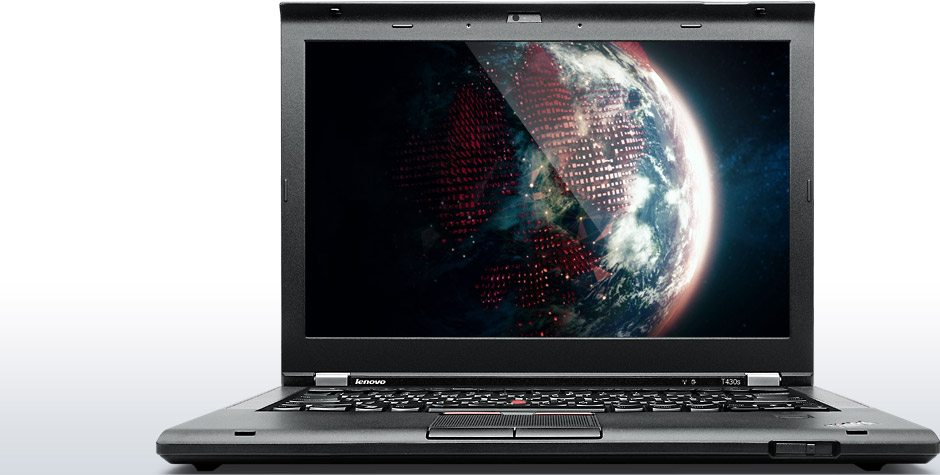
The ThinkPad T Series didn't get to be the best-selling business-notebook nameplate of all time by accident, and the latest iteration makes clear how it won that distinction. Lenovo's ThinkPad T430s blends portability, performance, features, and creature comforts in a near-perfect execution of a thin-and-light laptop that will suit corporate types, small-business buyers, and power users alike.
In past reviews (dating back to, oh, around 2001 or so), right about now is when we would start apologizing for the T Series' high price and arguing that it was justified. Not this time: The platform starts at just $790—a bargain—and our well-appointed Core i5 configuration checks in at a very reasonable $1,174.
One of the strengths of the T430s is that configure-to-order is alive and well for the platform. Lenovo lets you mix and match components to suit just about any need and budget, ranging from an Intel Core i3 CPU and 4GB of RAM to a Core i7 processor married to a whopping 16GB of memory. Another rare commodity is the UltraBay, which lets you slide out the standard optical drive and pop in a second battery or up to a 1TB hard drive. Sweet.
What you can't change, however, is the look of the T430s. The squared-off matte-black case is classic ThinkPad, take it or leave it. Admittedly, we have a touch of envy seeing the parade of brushed-metal laptops in a rainbow of silver shades pass by, but the sure grip provided by the almost-rubbery finish of the ThinkPad T430s keeps our lust in check. The laptop weighs at just under 4 pounds and measures a hair over an inch thick. Both measurements are more than reasonable for a 14-inch slimline machine, although they seem downright chunky next to all the svelte ultrabooks that have debuted this year. But hey, which among the latter have optical drives, let alone swappable bays? Correct: few and none. And if you're deciding between the ThinkPad T430s and its less expensive stablemate, the ThinkPad T430, note that the T430s is a quarter-inch thinner and 0.8 pound lighter.
The T430s is no less durable than its larger sibling. Both are considered business-rugged laptops and feature Lenovo's internal carbon-fiber skeleton to protect their internal parts. The T430s has also passed eight U.S. military testing specifications (Mil-Spec, for short) including those for humidity extremes, low/high temperature, altitude, vibration, and mechanical shock. The T430s keyboard is spill-resistant and has been tested (by Lenovo, not us) to survive up to 4 ounces of water poured directly into it with no damage to internal components.
Speaking of the keyboard, that's the most obvious major design change. The ThinkPad T420s employed the traditional-style keyboard that made the T Series a favorite of fast typists everywhere. Opening the lid of its T430s replacement, we were confronted with—say it ain't so!—a newfangled chiclet- or island-style keyboard, with keys jutting through a recessed backplane. Lenovo switched to this kind of keyboard on its X Series, its ThinkPad Edge models, and others, but we thought the T Series would be immune from such tinkering. Not so, and the T430 wasn't spared, either.
But a funny thing happened as we started to dash off a letter of complaint to Lenovo: We found we actually liked the new keyboard. It's rock solid—none of the flex in the middle that we've experienced on others—and the key plunge (the amount of up/down travel) seems better than on other chiclet-style keyboards we've tried. The spacing of the keys is perfect, and the concave curve of the keytops feels comfortable. What's missing is the spot-on audible and tactile feedback of the old ThinkPad keyboards, but as far as island-style keyboards go, this one is arguably the best. And, in the bargain, Lenovo was able to make this keyboard backlit, something the company couldn't do with the old-style unit. So, in addition to the standard ThinkLight (a small white LED above the screen that casts a gentle light on the keys), for $40 you can opt for a backlit keyboard with two brightness levels.
Comments
Post a Comment